If you're part of the TennMesh MeshCore network, then you already know how quickly the mesh has grown in just a few months and it's been exciting to see more reliable communications throughout East Tennessee and beyond! However, being on such a large and rapidly growing network doesn't come without some challenges, and the current challenge we're facing is the default 1-byte path hash size, which only allows for 256 possible values.
What's a path hash, anyway?
When a MeshCore packet travels across the network, it keeps a record of the nodes it's passed through. Each entry in that log is a short "hash" that represents a node. By default, those hashes are 1 byte long, which allows for 64 hops, but only 256 possible values.
So here's the current situation:
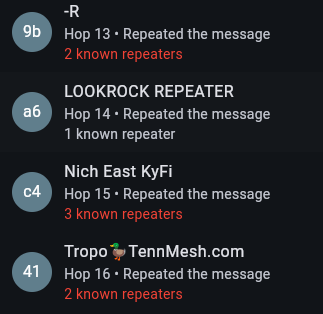
The default 1-byte path hash that MeshCore uses allows for 64 hops but only 256 possible unique device IDs (or hashes which is the 2-character ID associated with Repeaters, Companions, and Room Servers). As the TennMesh network has grown and we've now started connecting to our great neighbors in NC, SC, GA, KY, and VA, we've reached well beyond the 256 possible 1-byte path hashes. Looking at the Nodes list from the TennMesh Live Page, there are currently 685 Repeaters, 44 Room Servers, and 162 Companions at the time of this writing. You may have noticed this issue first-hand while looking at the path messages are taking and seeing where repeaters in the path show a list of multiple known repeaters in red like this:
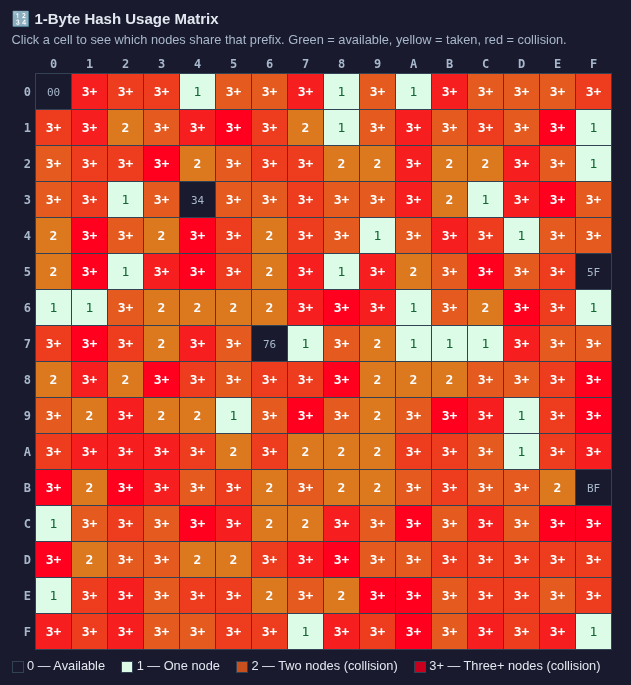
If we take a look at the 1-Byte Hash Usage Matrix below, we can see there are path hash collisions for just about every possible 1-byte path hash, and even numerous boxes showing 3+ users with the same one. Luckily, there's an easy solution to fix this: switching to 2-byte path hashes.
So what does 2-byte path hash do?
Bumping to 2-byte hashes expands those possible values from 256 to a whopping 65,536. The collision probability drops dramatically. For a growing regional network like TennMesh that's actively adding repeater sites, that headroom is important for our growth and future-proofing the network.
Will this break anything?
Making this switch does reduce the maximum hop count from 64 down to 32, but that's still plenty. We've yet to see a hop count higher than the mid-20s on TennMesh, so nothing will break in terms of the reach we're currently seeing.
Any repeater running firmware 1.14+ is multibyte capable and will repeat 1-byte, 2-byte, and 3-byte traffic. This means the transition is straightforward: once your repeater is on 1.14+, it's ready to repeat 2-byte traffic from Companion nodes that have made the switch.
The only repeaters that can't repeat 2-byte traffic are those still running firmware older than 1.14. That's why updating to 1.14+ is the important first step, and why we're encouraging the whole TennMesh community to get updated. The more of us that do, the better the network gets for everyone.
So that's how to make the repeaters compatible, but there's another optional step that we recommend taking, and that's setting the repeaters to send adverts using 2-byte path hashes. You can do this by logging into your repeater's remote admin page, selecting the Command Line tab at the bottom, and sending the following command:
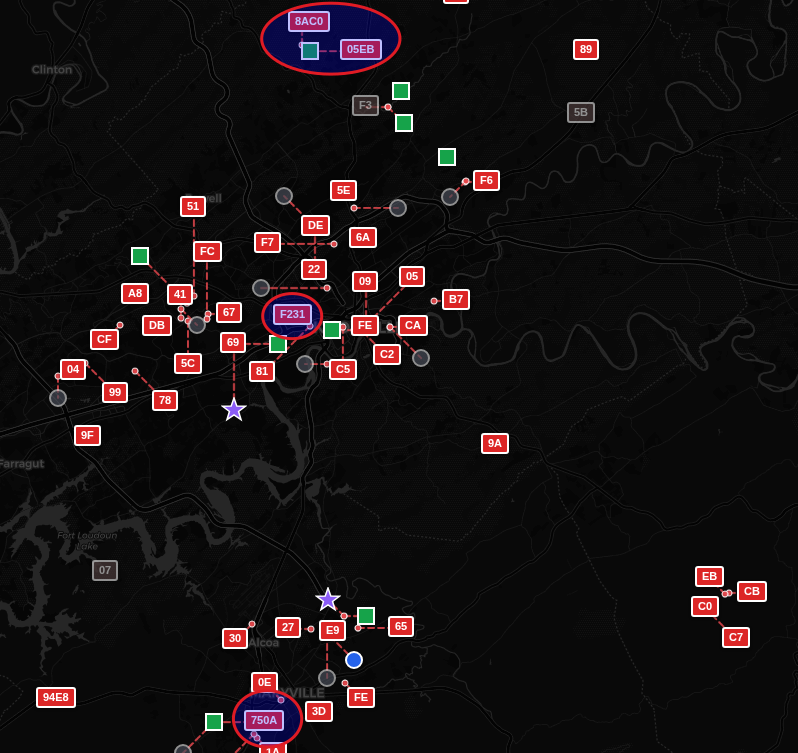
set path.hash.mode 1The reason for this is to help everyone see which repeaters have been updated. After this command has been sent, whenever the repeater sends an advert, it will be in the 2-byte format. We can then see which repeaters support 2-byte by visiting the static map on the TennMesh Live page and looking for the larger 4-character repeater labels on the map like the ones circled below:
How to make the switch on your repeater
It's a two-step process and takes less than five minutes:
Step 1: Update your firmware
Make sure your repeater is running MeshCore firmware version 1.14 or later. The 2-byte hash mode isn't available on older versions, so this is a required first step. If you're not sure what version you're on, check before proceeding.
Step 2: Enable 2-byte repeater adverts
This step is optional, but very helpful. Once you're on 1.14+, remote into your repeater, open the Command Line, and send this command:
set path.hash.mode 1That's it. One command and your repeater's adverts are broadcasting in 2-byte format.
How to make the switch on your Companion node
Set the path hash size
From the home screen on the MeshCore app, tap on the Gear icon on the top right > Scroll Down to Experimental Settings > Adjust the "Default Path Hash Size" option to "2-Byte (max 32 hops)"
Note: Only set this after most of the repeaters in your area have updated to firmware 1.14+. Repeaters still running older firmware will NOT repeat your 2-byte traffic.
Thanks and hope to see y'all on the mesh!